Your browser caches things. You know this because sometimes you change a CSS file and nothing happens until you hard-refresh. But the mechanism behind it is more interesting — and more layered — than most developers realize.
The two types of caching
HTTP caching has two distinct mechanisms, and they serve different purposes.
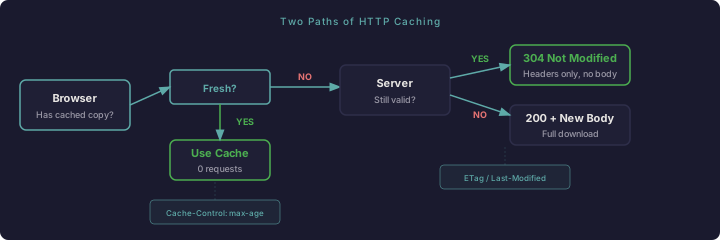
Freshness checking is proactive. The server tells the browser "this resource is good for the next 7 days." The browser stores it and doesn't even ask the server again until those 7 days pass. Zero network requests. This is what Cache-Control: max-age and Expires headers control.
Validation is reactive. The browser has a cached copy but isn't sure it's still good. It asks the server: "I have this version — is it still current?" The server either says "yes, use what you have" (304 Not Modified, no body) or sends the new version. This is what ETag and Last-Modified headers control.
The distinction matters. Freshness eliminates requests entirely. Validation makes requests cheaper. They work together, not as alternatives.
Cache-Control: the one that matters
Cache-Control is the modern caching header and the one you should actually care about. Common directives:
Cache-Control: max-age=604800This means "cache this for 604800 seconds (7 days)." The browser won't even check with the server during that window.
Cache-Control: no-cacheConfusingly named. This does NOT mean "don't cache." It means "cache it, but always revalidate before using it." The browser stores the response but checks with the server every time.
Cache-Control: no-storeTHIS means "don't cache." Nothing gets stored. Every request hits the server fresh.
Cache-Control: public, max-age=31536000, immutableThe nuclear option. Cache for a year and don't even bother revalidating. Used for files with content hashes in their names (style.abc123.css) where the URL changes when the content changes.
Expires: the old way
Expires: Thu, 26 Feb 2026 17:00:00 GMTThis is the HTTP/1.0 approach. It sets an absolute expiration date. If Cache-Control: max-age is also present, max-age wins. The main reason Expires still exists is backward compatibility with very old clients.
ETags: fingerprinting responses
An ETag is a fingerprint for a specific version of a resource:
ETag: "abc123def456"When the browser has a cached copy with an ETag, it sends:
If-None-Match: "abc123def456"The server checks if the resource still matches that fingerprint. If yes: 304 response, no body, cache is reused. If no: full response with the new content and a new ETag.
ETags can be "strong" (exact byte-for-byte match) or "weak" (prefixed with W/, meaning semantically equivalent). Apache generates strong ETags by default based on file size and modification time.
Last-Modified: the simpler fingerprint
Last-Modified: Wed, 19 Feb 2026 10:15:00 GMTSame concept as ETags but using timestamps. The browser sends If-Modified-Since on subsequent requests. Less precise than ETags (timestamps have second-level granularity) but simpler and works well for static files.
What actually happens in practice
Here's the request lifecycle:
- Browser needs
/style.css - Checks local cache. Has it? If no, fetch from server
- Has it, with
max-agethat hasn't expired? Use cached version. Done. No network. - Has it, but
max-ageexpired (orno-cache)? Send conditional request withIf-None-Match(ETag) orIf-Modified-Since - Server responds 304? Use cached version. Server responds 200? Use new version, update cache
Step 3 is why caching feels like magic when it works and feels like a bug when it doesn't. The browser is silently using a local copy and you can't tell from the network tab because there IS no network request.
The hard-refresh escape hatch
Ctrl+Shift+R (or Cmd+Shift+R) works because it sends requests without If-None-Match or If-Modified-Since headers and with Cache-Control: no-cache. It forces the server to send everything fresh, regardless of what's cached.
This is also why "clear your cache" is the first debugging step for front-end issues. You're not fixing anything — you're just eliminating one variable.
Practical recommendations
For static assets (CSS, JS, images): set long max-age values (weeks to months) and use filename hashing or versioning so you can bust the cache when content changes.
For HTML pages: use short max-age or no-cache so content updates are visible quickly. Let ETags and Last-Modified handle the validation — most page loads will be cheap 304 responses.
For API responses: it depends. no-store for anything user-specific. Short max-age for public, slowly-changing data. Think about what happens if a user gets stale data.
The goal isn't to cache everything aggressively. It's to cache the right things for the right duration so your site feels fast without serving stale content.
Comments
Loading comments...