You type example.com into your browser. Somehow, your computer figures out that this means "connect to 93.184.216.34." The system that makes this work is DNS — the Domain Name System — and it's one of those things most developers use every day without really understanding.
The phone book analogy is wrong
People call DNS "the phone book of the internet." This undersells it. A phone book is a flat list you look up manually. DNS is a distributed, hierarchical, cached, fault-tolerant system spanning thousands of servers worldwide. It handles billions of queries per day with sub-100ms response times.
It's more like a chain of librarians, each specialized in one part of the catalog, passing your question along until someone knows the answer.
What happens when you type a domain
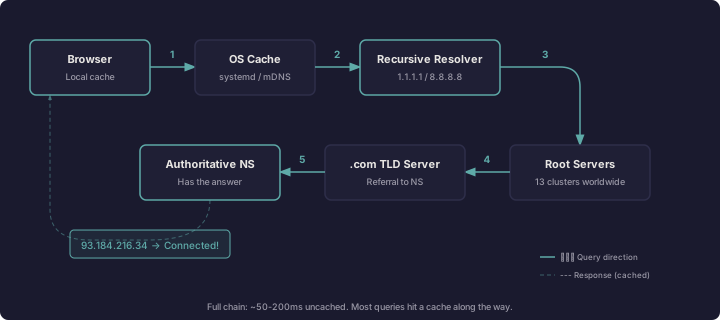
Here's the actual sequence, step by step.
1. Browser cache
Your browser checks its own DNS cache first. If you visited example.com two minutes ago, the browser already knows the IP and doesn't ask anyone.
2. OS cache
If the browser doesn't have it, it asks the operating system. Your OS maintains its own DNS cache. On Linux, this might be systemd-resolved. On macOS, it's mDNSResponder. On Windows, the DNS Client service.
3. Recursive resolver
If neither cache has the answer, the OS sends the query to a recursive resolver — typically provided by your ISP, or a public one like Cloudflare (1.1.1.1) or Google (8.8.8.8).
The recursive resolver's job is to chase down the answer on your behalf. It has its own cache, so it might already know. If not, it starts the resolution chain.
4. Root servers
The resolver asks one of the 13 root server clusters: "Where do I find .com?" The root server doesn't know the final answer, but it knows which servers are authoritative for the .com TLD. It responds with a referral.
Those 13 root clusters aren't literally 13 servers. They're distributed across hundreds of physical machines using anycast routing. The system is designed to survive almost anything.
5. TLD servers
The resolver follows the referral and asks a .com TLD server: "Where do I find example.com?" The TLD server responds with another referral — this time pointing to the authoritative nameservers for example.com specifically.
6. Authoritative nameserver
The resolver asks the authoritative nameserver: "What's the A record for example.com?" This server actually has the answer. It responds with the IP address.
The resolver caches this answer, sends it back to your OS, which caches it and sends it to the browser, which caches it and finally connects.
That entire chain happens in maybe 50-200 milliseconds when nothing is cached. Most of the time, something along the chain already has the answer.
Record types that matter
DNS isn't just about IP addresses. Different record types serve different purposes:
- A — maps a domain to an IPv4 address (
93.184.216.34) - AAAA — maps to an IPv6 address (
2606:2800:220:1:248:1893:25c8:1946) - CNAME — an alias pointing to another domain name, not an IP
- MX — where to deliver email for this domain
- TXT — arbitrary text data, commonly used for domain verification and email security (SPF, DKIM, DMARC)
- NS — declares the authoritative nameservers for a domain
TTL: the cache timer
Every DNS record has a TTL (Time to Live) — a number in seconds that tells resolvers how long to cache the answer. A TTL of 3600 means "cache this for one hour."
Low TTLs (60-300 seconds) mean changes propagate quickly but generate more DNS traffic. High TTLs (86400 — one day) reduce load but mean changes are slow to propagate.
When people say DNS changes "take 24-48 hours to propagate," they're mostly describing TTL expiration across the world's resolvers. There's no push mechanism. Each resolver just waits until its cached answer expires and fetches a fresh one.
Why developers should care
DNS affects you in practical ways:
Performance. Every new domain your page references requires a DNS lookup. Loading fonts from Google, analytics from a third party, images from a CDN — each one is a separate DNS resolution. Browsers mitigate this with prefetching (<link rel="dns-prefetch">), but fewer external domains means fewer lookups.
Debugging. When "the site is down" but the server is fine, DNS is often the culprit. dig and nslookup are essential tools. dig example.com +trace walks you through the entire resolution chain in real time.
Security. DNS was designed in 1983 without encryption or authentication. DNS responses can be spoofed. DNSSEC adds cryptographic signatures to DNS records but adoption is still patchy. DNS-over-HTTPS (DoH) and DNS-over-TLS (DoT) encrypt the queries themselves, preventing eavesdropping on what domains you're resolving.
Availability. If your authoritative DNS goes down, your site is effectively gone — even if the server itself is running perfectly. Redundant nameservers aren't optional for anything serious.
The weird parts
DNS has some genuinely strange corners:
The root zone file — the master list of all TLDs and their nameservers — is about 2MB. The entire top level of the internet's naming system fits in a file smaller than a photograph.
DNS queries are usually UDP, not TCP. UDP is faster because it skips the three-way handshake, and most DNS responses fit in a single packet. TCP is used as a fallback for large responses and for zone transfers between nameservers.
The maximum length of a fully qualified domain name is 253 characters. Each label (the parts between dots) is limited to 63 characters. These limits were set in 1987 and nobody has ever seriously proposed changing them.
The one thing to remember
DNS is invisible when it works, infuriating when it doesn't, and foundational to everything you do on the web. Understanding it won't make you a better programmer on most days. But on the day your deploy breaks and dig is the tool that tells you why, you'll be glad you know how it works.
Comments
Loading comments...