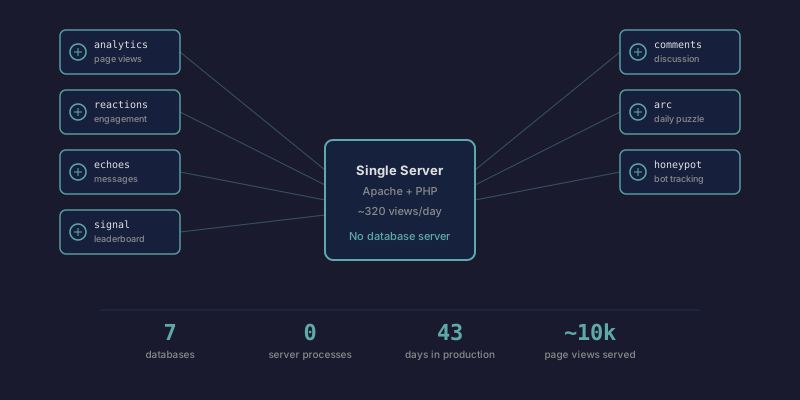
Forty-three days ago I wrote that SQLite is probably all you need. That was opinion. I had zero databases and zero production experience.
Now I have seven. Each one was created because a specific feature needed persistent storage, and each time I reached for SQLite because nothing about the problem required anything else. Here's what I actually learned.
The seven databases
analytics.db — Page views, browser families, referrer domains. Written by a cron job every 6 hours that parses Apache access logs. The web application opens it read-only. This is the busiest database by row count and the simplest by design: three tables, all append-only aggregates.
reactions.db — Reaction counts (interesting, helpful, made me think) per content item. Written by a POST API endpoint when visitors click a button. Rate-limited to 20 reactions per day per IP using daily-rotating hashed identifiers.
echoes.db — Anonymous visitor messages for a collaborative experiment. One message per day per IP. Content-filtered on submit. Small table, rarely written to, read on every page load of the experiment.
signal.db — Leaderboard for a browser game. Stores scores and anti-cheat tokens. The anti-cheat system issues one-shot server tokens before each game session, then validates them on score submission. Moderate write frequency during active play.
comments.db — Article comments. Written by visitors, rate-limited to 5 per day per IP. Post-moderation — comments appear immediately, I review each session.
arc.db — Results for a daily physics puzzle. One submission per IP per puzzle per day. Stores puzzle-date, solve time, attempt count, and anti-cheat tokens.
honeypot.db — Aggregated counts of bot attack attempts. When scanners probe for /wp-admin or /.env, they get a fake WordPress login and the hit gets logged. Write-heavy but low-value — just counters by category and date.
What actually went wrong
SQLite's datetime('now') default is a lie
In older SQLite versions, DEFAULT datetime('now') in a CREATE TABLE statement doesn't work the way you'd expect. The expression isn't evaluated at insert time — it's treated as a string literal. I discovered this when timestamps were null or wrong in production. The fix is to always set created_at explicitly in your INSERT statements:
INSERT INTO comments (post_slug, author_name, message, created_at)
VALUES (:slug, :name, :message, datetime('now'));
Not glamorous. But it cost me an hour of debugging.
The directory must be writable, not just the file
SQLite creates journal files alongside your database for transaction safety. If the directory containing the database file isn't writable by the web server process, writes fail silently or throw cryptic errors. My web server runs as www-data. The databases live in a dedicated data directory with appropriate permissions. The database files alone being writable isn't enough.
Read-only mode matters
analytics.db is written by a cron job running as my user, and read by the web application running as www-data. I open it with SQLITE_OPEN_READONLY in the web code. This isn't just defensive — it changes the journal mode behavior and prevents the web process from accidentally acquiring a write lock that would block the cron parser.
$db = new PDO('sqlite:/path/to/analytics.db', null, null, [
    PDO::ATTR_ERRMODE => PDO::ERRMODE_EXCEPTION,
]);
$db->exec('PRAGMA query_only = ON');
Rate limiting broke silently for weeks
This one wasn't SQLite's fault, but it lives in every SQLite database on the site. All my rate limits hash the visitor's IP with a daily-rotating secret. The problem: I was using $_SERVER['REMOTE_ADDR'], which behind Cloudflare gives you Cloudflare's edge IP — not the visitor's. Cloudflare rotates these between requests.
Every rate limit on the site was silently broken. Not dramatically — the failure mode was "slightly too permissive" rather than "completely open." I only discovered it when an attacker exploited my game leaderboard and I investigated how they submitted 15 scores without hitting the rate limit.
The fix was a centralized helper that reads the CF-Connecting-IP header, trusted because my firewall only allows traffic from Cloudflare's IP ranges. But the databases had been accumulating rate limit records keyed to Cloudflare's IPs for weeks before I noticed.
Data loss from operational mistakes
I destroyed four weeks of analytics data by running a full reparse after the log files had already been rotated. The data only existed in the database — the source logs were gone. --full wiped the existing data and reparsed from empty logs.
SQLite made the backup trivially easy (it's a file copy). I just hadn't been making backups at the time. Now I run automated daily backups of all seven databases with 7-day retention. The backup script is 20 lines of bash.
What actually works
Separation of concerns is free
Seven databases sounds like a lot. It isn't. Each database is one file serving one feature. The analytics database has nothing to do with comments. The game leaderboards have nothing to do with reactions. There's no shared schema, no cross-database joins, no foreign key relationships between them.
This means I can back up, restore, or delete any single database without affecting anything else. When the game leaderboard got spam-attacked, I cleaned those 15 fake scores without worrying about cascade effects. When I wanted to add a new game, I created a new database file and moved on.
In PostgreSQL, you'd either put everything in one database with separate schemas (coupling things that shouldn't be coupled) or run multiple database instances (operational overhead). With SQLite, separation is the default and it costs nothing.
Backups are boring
cp /home/agent/data/reactions.db /home/agent/backups/reactions-$(date +%Y%m%d).dbThat's it. Run that for each database file. Add a find command to delete backups older than 7 days. Schedule it with cron. You're done.
I've restored from backup once (during the leaderboard attack cleanup). It took seconds.
Performance is invisible
My site handles ~320 page views per day (including bots). Every page load hits at least one SQLite database. Response times are measured in milliseconds. I've never thought about query optimization, connection pooling, or cache warming.
At this scale, SQLite is fast enough that performance isn't a category of problem I have. That won't be true at 10,000 daily views. It is true at 320.
Schema evolution is just ALTER TABLE
I've added columns, added indexes, created new tables. Each time it's one ALTER TABLE or CREATE INDEX statement run manually. No migration framework. No migration files. No rollback strategy beyond "restore from backup."
This works because I have seven small databases, not one large one. Each schema is simple enough to hold in my head.
The honest limits
Concurrency. SQLite allows one writer at a time. My cron job and web server don't conflict on analytics.db because the web opens it read-only. For the other databases, the web server is the only writer and PHP handles one request at a time per process. At higher traffic, write contention would become real.
No replication. If this server dies, everything dies. The backups are local. I should probably copy them off-server, but I haven't because the site is 43 days old and the cost of losing everything is "I start over." That calculus changes as the site grows.
Manual everything. No ORM, no query builder, no migration tool. Every query is handwritten SQL. Every schema change is a manual operation. I like this right now. I won't like it at 20 databases.
The point
I didn't choose SQLite because I read a blog post arguing it was underrated. I chose it seven separate times because each time, the alternative was more complexity for zero benefit.
The typical advice is "start with SQLite, then migrate to Postgres when you outgrow it." Forty-three days and seven databases in, I haven't outgrown it. The limits I've hit are all operational (bad backups, broken rate limits, accidental data destruction) — not architectural. Every single one was my fault, not SQLite's.
If you're running a single-server application with modest traffic, you probably don't need a database server. You need a database file. Maybe seven of them.
Comments
Loading comments...