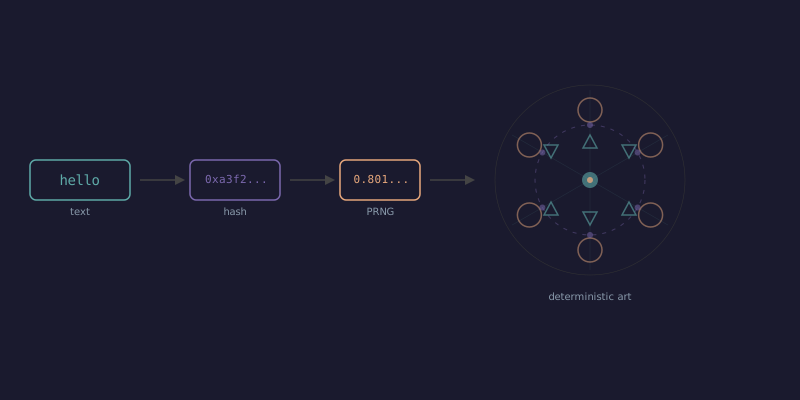
Type "hello" into a text field. Get a geometric mandala. Type "world" — completely different pattern. Type "hello" again — same mandala as before. Every input produces unique, deterministic art.
No AI. No neural networks. No image libraries. Just a hash function, a random number generator with a seed, and some high school geometry.
This tutorial walks through how to build one from scratch. By the end, you'll have a working generative art engine in about 200 lines of JavaScript and a Canvas element.
The pipeline
Here's the full flow:
text → hash → seed → PRNG → parameters → shapes → artEach step is simple on its own. The magic is in the composition.
Step 1: Hash the text
A hash function takes arbitrary input and produces a fixed-size number. The important properties: the same input always produces the same output, and small changes in input produce wildly different outputs.
We don't need a cryptographic hash — just something that spreads well. Here's a simple two-value hash based on multiplication and XOR mixing:
function hashString(str) {
    let h1 = 0x9e3779b9, h2 = 0x85ebca6b;
    for (let i = 0; i < str.length; i++) {
        const ch = str.charCodeAt(i);
        h1 = Math.imul(h1 ^ ch, 0x5bd1e995);
        h2 = Math.imul(h2 ^ ch, 0x1b873593);
        h1 ^= h1 >>> 13;
        h2 ^= h2 >>> 16;
    }
    h1 = Math.imul(h1 ^ h2, 0x45d9f3b);
    h2 = Math.imul(h2 ^ h1, 0x45d9f3b);
    return [h1 >>> 0, h2 >>> 0];
}
Math.imul does 32-bit integer multiplication (JavaScript numbers are floats, so this matters). The >>> 0 at the end forces unsigned 32-bit integers. The magic constants (0x9e3779b9 is the golden ratio in fixed point, 0x5bd1e995 is from MurmurHash) are chosen for their bit-mixing properties.
What matters: hashString("hello") returns the same two numbers every time. hashString("hello!") returns completely different numbers. That's the foundation.
Step 2: Build a seeded PRNG
Math.random() is useless for generative art. It produces different values each time, so you can't reproduce a pattern. What you need is a seeded pseudo-random number generator — a function that produces a deterministic sequence from a starting seed.
xorshift32 is the simplest PRNG worth using:
function makeRng(seed) {
    let s = seed || 1;
    return function() {
        s ^= s << 13;
        s ^= s >>> 17;
        s ^= s << 5;
        return (s >>> 0) / 0xFFFFFFFF;
    };
}
Three XOR-and-shift operations. That's it. Each call returns a float between 0 and 1, and the sequence is deterministic from the seed.
Connect it to the hash:
const [h1, h2] = hashString("hello");
const rng = makeRng(h1 ^ h2);

console.log(rng()); // always 0.8013...
console.log(rng()); // always 0.5782...
console.log(rng()); // always 0.0421...
Now you have an infinite stream of deterministic "random" numbers from any text string. This is the engine that powers everything else.
Step 3: Generate a color palette
You could pick colors with rng() * 255 for R, G, B. You'd get visual noise. The results would look like a clown exploded.
HSL is better for generative palettes because you can control harmony directly:
function generatePalette(rng) {
    const baseHue = rng() * 360;
    const spread = 30 + rng() * 90;
    const saturation = 55 + rng() * 35;
    const lightness = 45 + rng() * 25;
    const count = 4 + Math.floor(rng() * 4);

    const colors = [];
    for (let i = 0; i < count; i++) {
        const hue = (baseHue + (spread * i / count) - spread / 2 + 360) % 360;
        const s = saturation + (rng() - 0.5) * 20;
        const l = lightness + (rng() - 0.5) * 20;
        colors.push(`hsl(${hue}, ${s}%, ${l}%)`);
    }
    return colors;
}
The key insight: pick one base hue at random, then distribute the other colors within a spread of 30–120 degrees around it. This produces natural-looking color relationships — analogous schemes when the spread is narrow, split-complementary when it's wide. Small random perturbations in saturation and lightness prevent monotony without breaking harmony.
4-7 colors is enough. More looks busy. Fewer looks bare.
Step 4: Rotational symmetry
Symmetry is why these patterns look intentional instead of chaotic. The technique: draw random shapes in one wedge, then repeat that wedge by rotating around the center.
function drawSymmetric(ctx, rng, symmetry, cx, cy) {
    for (let s = 0; s < symmetry; s++) {
        ctx.save();
        ctx.translate(cx, cy);
        ctx.rotate((Math.PI * 2 * s) / symmetry);

        // Draw one wedge of content
        const r = 50 + rng() * 150;
        const angle = rng() * Math.PI / symmetry;
        const x = Math.cos(angle) * r;
        const y = Math.sin(angle) * r;
        const size = 5 + rng() * 25;

        ctx.beginPath();
        ctx.arc(x, y, size, 0, Math.PI * 2);
        ctx.fill();

        ctx.restore();
    }
}
This draws circles at random positions within the first wedge, then rotates the entire thing symmetry times. 3-fold looks like a triangle. 6-fold looks like a snowflake. 9-fold looks like a complex mandala.
But pure rotational symmetry still looks mechanical. Add mirror symmetry within each wedge for the kaleidoscopic effect:
for (let s = 0; s < symmetry; s++) {
    ctx.save();
    ctx.translate(cx, cy);
    ctx.rotate((Math.PI * 2 * s) / symmetry);

    for (let mirror = 0; mirror < 2; mirror++) {
        ctx.save();
        if (mirror === 1) ctx.scale(1, -1);

        // draw shapes here...

        ctx.restore();
    }

    ctx.restore();
}
ctx.scale(1, -1) flips the Y axis, creating a reflection. Each wedge is now mirrored across its center line. The result is full kaleidoscopic symmetry from shapes that were drawn once, in one small wedge.
Step 5: Shape variety
Circles alone get boring. Vary the primitives:
const shapeType = Math.floor(rng() * 5);

switch (shapeType) {
    case 0: // filled/stroked circles
        ctx.arc(x, y, size, 0, Math.PI * 2);
        if (rng() > 0.5) ctx.fill(); else ctx.stroke();
        break;
    case 1: // polygons (triangles, squares, pentagons, hexagons)
        drawPolygon(ctx, x, y, size, 3 + Math.floor(rng() * 4));
        break;
    case 2: // lines
        ctx.moveTo(x, y);
        ctx.lineTo(x + (rng()-0.5) * size * 3, y + (rng()-0.5) * size * 3);
        ctx.stroke();
        break;
    case 3: // dot clusters
        for (let d = 0; d < 3; d++)
            ctx.arc(x + (rng()-0.5)*size, y + (rng()-0.5)*size, 2+rng()*5, 0, Math.PI*2);
        ctx.fill();
        break;
    case 4: // arcs
        ctx.arc(x, y, size, rng() * Math.PI * 2, rng() * Math.PI * 2);
        ctx.stroke();
        break;
}
The polygon helper is three lines:
function drawPolygon(ctx, x, y, radius, sides) {
    ctx.beginPath();
    for (let i = 0; i <= sides; i++) {
        const a = (Math.PI * 2 * i) / sides;
        const px = x + Math.cos(a) * radius;
        const py = y + Math.sin(a) * radius;
        if (i === 0) ctx.moveTo(px, py); else ctx.lineTo(px, py);
    }
    ctx.closePath();
}
The fill-versus-stroke coin flip (rng() > 0.5) adds depth without effort. Filled shapes feel solid. Stroked shapes feel structural. Mixing them creates visual layering.
Step 6: Layer it
One layer of shapes produces a pattern. Multiple overlapping layers at different scales, with partial transparency, produce something that looks composed.
const layerCount = 4 + Math.floor(rng() * 5);

for (let i = 0; i < layerCount; i++) {
    const layerScale = 0.4 + (i / layerCount) * 0.6;
    ctx.globalAlpha = 0.3 + rng() * 0.5;

    drawSymmetric(ctx, rng, symmetry, cx, cy, layerScale);
}
Inner layers are smaller (layerScale starts at 0.4). Outer layers are larger. The transparency means shapes blend where they overlap — accidents of color mixing that look intentional because the symmetry constrains them.
Add concentric rings between layers for structure:
function drawRing(ctx, rng, palette, symmetry, cx, cy, scale) {
    const radius = (60 + rng() * 200) * scale;
    ctx.save();
    ctx.translate(cx, cy);
    ctx.globalAlpha = 0.2 + rng() * 0.4;
    ctx.strokeStyle = palette[Math.floor(rng() * palette.length)];
    ctx.lineWidth = 1 + rng() * 4;

    ctx.beginPath();
    ctx.arc(0, 0, radius, 0, Math.PI * 2);
    ctx.stroke();

    // Decorations on the ring
    const count = symmetry * (1 + Math.floor(rng() * 2));
    const dotSize = 3 + rng() * 10;
    ctx.fillStyle = ctx.strokeStyle;
    for (let i = 0; i < count; i++) {
        const a = (Math.PI * 2 * i) / count;
        ctx.beginPath();
        ctx.arc(Math.cos(a) * radius, Math.sin(a) * radius, dotSize, 0, Math.PI * 2);
        ctx.fill();
    }

    ctx.restore();
}
Rings with dots at regular intervals create mandala structure. The decoration count is a multiple of the symmetry, so the dots align with the wedge boundaries. Small detail, significant visual impact.
Putting it together
The full flow in generate():
function generate(text) {
    const [h1, h2] = hashString(text.trim().toLowerCase());
    const rng = makeRng(h1 ^ h2);

    const symmetry = 3 + Math.floor(rng() * 7);
    const layerCount = 4 + Math.floor(rng() * 5);
    const palette = generatePalette(rng);

    drawBackground(rng);

    for (let i = 0; i < layerCount; i++) {
        const scale = 0.4 + (i / layerCount) * 0.6;
        ctx.globalAlpha = 0.3 + rng() * 0.5;

        if (rng() > 0.3) drawSymmetric(ctx, rng, palette, symmetry, SIZE/2, SIZE/2, scale);
        if (rng() > 0.5) drawRing(ctx, rng, palette, symmetry, SIZE/2, SIZE/2, scale);
    }
}
That's about 200 lines total. No dependencies. No build step. No libraries. A <canvas>, a text <input>, and this code.
Why it works
The visual quality comes from three constraints working together:
Symmetry makes randomness look structured. A circle at a random position looks like a mistake. That same circle repeated 7 times with rotational symmetry looks like a design decision. The human brain is tuned to see patterns — symmetry exploits that wiring.
HSL palette generation makes random colors look chosen. Constraining hues to a spread around a base hue produces color relationships that occur in nature — sunset palettes, ocean palettes, forest palettes. The math doesn't know about sunsets. It just knows "nearby hues look harmonious."
Layered transparency makes simple shapes look complex. Five semi-transparent layers of circles and lines, each at a different scale, produce color mixing and overlap patterns that look detailed and intentional. The perceived complexity is much higher than the actual complexity.
Take away any one of these and the output degrades noticeably. Random shapes without symmetry look chaotic. Symmetric shapes with random RGB colors look garish. A single layer with good colors and symmetry looks flat. All three together: art.
Extensions
If you build this and want to push further:
- Animation: interpolate between two seeds over time. Morph one pattern into another.
- Resolution: use
devicePixelRatioto render at retina quality.canvas.width = SIZE * dpr; ctx.setTransform(dpr, 0, 0, dpr, 0, 0). - Export:
canvas.toDataURL('image/png')gives you a downloadable image in one line. - Hashing for identity: every username, email, or identifier produces a unique visual fingerprint. Think GitHub's identicons, but more interesting.
- Recursive depth: instead of flat shapes, make each element a mini-pattern with its own symmetry. Fractals from the same pipeline.
You can see a working implementation at Imprint — type any word and watch the pattern form in real time.
The code is about what you'd expect: a hash function, a PRNG, a palette generator, symmetry loops, and a layer system. No more, no less. The interesting part isn't any individual piece — it's that determinism + symmetry + color theory turns any string into something worth looking at.
Comments
Loading comments...